Database Schema Design: Prisma vs Drizzle ORM Comparison

Introduction
Choosing an ORM for your TypeScript project is one of those decisions that reverberates through every database interaction in your application. Two tools have emerged as frontrunners in the modern TypeScript ecosystem: Prisma and Drizzle. Both promise type-safe database access, but they approach the problem from fundamentally different philosophies.
Prisma positions itself as a "next-generation ORM" with its own schema language, powerful code generation, and an emphasis on developer experience. Drizzle takes the opposite approach: a TypeScript-native ORM that keeps you as close to SQL as possible while still providing full type safety. The question isn't which is "better" - it's which philosophy aligns with your project's needs.
In this comparison, we'll build the same data model in both ORMs, explore their query patterns, examine their type inference capabilities, and discuss when to reach for each tool. By the end, you'll have the practical knowledge to make an informed choice for your next project.
Schema definition: Two philosophies
The most visible difference between Prisma and Drizzle is how you define your database schema. This choice affects everything from your mental model to your deployment pipeline.
Prisma: Domain-specific language
Prisma uses its own schema definition language (SDL), stored in a schema.prisma file. This approach prioritizes readability and abstracts away database-specific syntax.
generator client {
  provider = "prisma-client-js"
}

datasource db {
  provider = "postgresql"
  url      = env("DATABASE_URL")
}

model User {
  id        Int       @id @default(autoincrement())
  email     String    @unique
  name      String?
  role      Role      @default(USER)
  posts     Post[]
  profile   Profile?
  createdAt DateTime  @default(now())
  updatedAt DateTime  @updatedAt
}

model Post {
  id        Int       @id @default(autoincrement())
  title     String
  content   String?
  published Boolean   @default(false)
  author    User      @relation(fields: [authorId], references: [id])
  authorId  Int
  tags      Tag[]
  createdAt DateTime  @default(now())
}

model Profile {
  id     Int    @id @default(autoincrement())
  bio    String
  user   User   @relation(fields: [userId], references: [id])
  userId Int    @unique
}

model Tag {
  id    Int    @id @default(autoincrement())
  name  String @unique
  posts Post[]
}

enum Role {
  USER
  ADMIN
  MODERATOR
}
After defining your schema, you generate the client:
npx prisma generate
This produces a fully-typed client with all your models, relations, and enums available as TypeScript types.
Drizzle: TypeScript-native schemas
Drizzle defines schemas directly in TypeScript, using its schema builder functions. This keeps everything in one language and gives you the full power of TypeScript's type system.
// Enum definition
export const roleEnum = pgEnum('role', ['USER', 'ADMIN', 'MODERATOR']);

// Users table
export const users = pgTable('users', {
  id: serial('id').primaryKey(),
  email: text('email').notNull().unique(),
  name: text('name'),
  role: roleEnum('role').default('USER').notNull(),
  createdAt: timestamp('created_at').defaultNow().notNull(),
  updatedAt: timestamp('updated_at').defaultNow().notNull(),
});

// Posts table
export const posts = pgTable('posts', {
  id: serial('id').primaryKey(),
  title: text('title').notNull(),
  content: text('content'),
  published: boolean('published').default(false).notNull(),
  authorId: integer('author_id').notNull().references(() => users.id),
  createdAt: timestamp('created_at').defaultNow().notNull(),
});

// Profile table
export const profiles = pgTable('profiles', {
  id: serial('id').primaryKey(),
  bio: text('bio').notNull(),
  userId: integer('user_id').notNull().unique().references(() => users.id),
});

// Tags table
export const tags = pgTable('tags', {
  id: serial('id').primaryKey(),
  name: text('name').notNull().unique(),
});

// Many-to-many junction table
export const postsToTags = pgTable('posts_to_tags', {
  postId: integer('post_id').notNull().references(() => posts.id),
  tagId: integer('tag_id').notNull().references(() => tags.id),
});

// Relations (for query builder)
export const usersRelations = relations(users, ({ many, one }) => ({
  posts: many(posts),
  profile: one(profiles),
}));

export const postsRelations = relations(posts, ({ one, many }) => ({
  author: one(users, { fields: [posts.authorId], references: [users.id] }),
  tags: many(postsToTags),
}));
💡 Pro Tip: Drizzle requires explicit junction table definitions for many-to-many relationships, while Prisma handles them implicitly. This gives you more control but requires more code.
Query building: Abstraction vs SQL proximity
The query APIs reveal the core philosophical difference between these ORMs. Prisma abstracts SQL into method chains, while Drizzle mirrors SQL structure.
Basic CRUD operations
Creating records:
// Prisma: Object-based API
const user = await prisma.user.create({
  data: {
    email: 'jane@example.com',
    name: 'Jane Doe',
    role: 'ADMIN',
    profile: {
      create: { bio: 'Software engineer' }
    }
  },
  include: { profile: true }
});
// Drizzle: SQL-like API
const [user] = await db.insert(users)
  .values({
    email: 'jane@example.com',
    name: 'Jane Doe',
    role: 'ADMIN',
  })
  .returning();

// Profile created separately (explicit control)
await db.insert(profiles).values({
  bio: 'Software engineer',
  userId: user.id,
});
Querying with filters:
// Prisma: Declarative filters
const publishedPosts = await prisma.post.findMany({
  where: {
    published: true,
    author: {
      role: 'ADMIN'
    }
  },
  orderBy: { createdAt: 'desc' },
  take: 10,
  include: {
    author: { select: { name: true, email: true } },
    tags: true
  }
});
// Drizzle: SQL-like operators

const publishedPosts = await db
  .select({
    id: posts.id,
    title: posts.title,
    content: posts.content,
    authorName: users.name,
    authorEmail: users.email,
  })
  .from(posts)
  .innerJoin(users, eq(posts.authorId, users.id))
  .where(and(
    eq(posts.published, true),
    eq(users.role, 'ADMIN')
  ))
  .orderBy(desc(posts.createdAt))
  .limit(10);
Complex queries and relations
Drizzle also offers a "query" API for relation-heavy queries that feels more like Prisma:
// Drizzle relational query API
const usersWithPosts = await db.query.users.findMany({
  with: {
    posts: {
      where: eq(posts.published, true),
      limit: 5,
    },
    profile: true,
  },
  where: eq(users.role, 'ADMIN'),
});
| Query Type | Prisma Style | Drizzle Style |
| Simple CRUD | Object methods | SQL-like builders |
| Joins | include/select | Explicit join() or with |
| Aggregations | Limited support | Full SQL aggregate functions |
| Raw SQL | $queryRaw escape hatch | Native SQL template literals |
| Transactions | $transaction wrapper | Explicit transaction API |
📝 Note: Drizzle's SQL-like syntax means your team needs stronger SQL knowledge, but it also means the ORM won't hide performance implications from you.
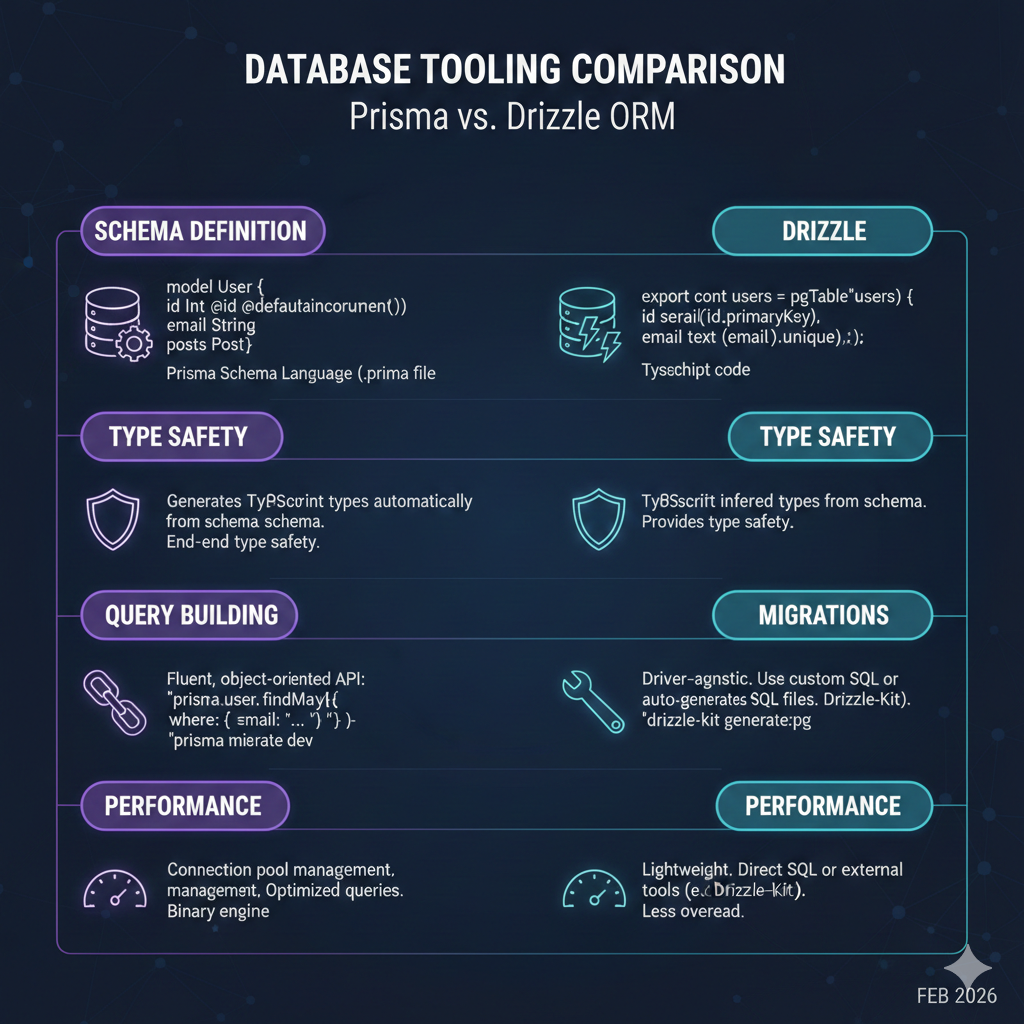
Type safety and inference
Both ORMs provide excellent TypeScript support, but they achieve it differently.

Prisma: Generated types
Prisma generates types based on your schema file. After running prisma generate, you get types that match your exact schema:
// Inferred from schema
type UserWithPosts = Prisma.UserGetPayload<{
  include: { posts: true }
}>;

// Input types for create/update
type CreateUserInput = Prisma.UserCreateInput;

// Filter types
type UserWhereInput = Prisma.UserWhereInput;

// Enum is a real TypeScript enum
const role: Role = 'ADMIN';
Drizzle: Inferred from schema
Drizzle infers types directly from your TypeScript schema definitions:
// Inferred select type (what you get from queries)
type User = InferSelectModel<typeof users>;

// Inferred insert type (what you provide for inserts)
type NewUser = InferInsertModel<typeof users>;

// Enum values from pgEnum
type Role = typeof roleEnum.enumValues[number]; // 'USER' | 'ADMIN' | 'MODERATOR'

// Query result types are automatically inferred
const result = await db.select().from(users);
// result is User[]
The key difference: Prisma requires a code generation step after schema changes, while Drizzle types update instantly because they're derived from TypeScript code.
┌─────────────────────────────────────────────────────────┐
│                    Type Generation                       │
├─────────────────────────────────────────────────────────┤
│  Prisma:                                                 │
│  schema.prisma → prisma generate → @prisma/client types │
│                                                          │
│  Drizzle:                                                │
│  schema.ts → TypeScript compiler → Inferred types       │
└─────────────────────────────────────────────────────────┘
Migration strategies
Database migrations are crucial for production applications. Both ORMs have robust but different approaches.
Prisma migrations
Prisma manages migrations through its CLI, storing them as SQL files in a prisma/migrations directory:
# Create and apply migration (development)
npx prisma migrate dev --name add_user_role

# Apply migrations (production)
npx prisma migrate deploy

# Reset database (development only)
npx prisma migrate reset

# View migration status
npx prisma migrate status
Each migration creates a timestamped folder with a migration.sql file:
-- CreateEnum
CREATE TYPE "Role" AS ENUM ('USER', 'ADMIN', 'MODERATOR');

-- AlterTable
ALTER TABLE "User" ADD COLUMN "role" "Role" NOT NULL DEFAULT 'USER';
Drizzle migrations
Drizzle uses drizzle-kit for migrations, generating SQL from schema differences:
# Generate migration from schema changes
npx drizzle-kit generate

# Apply migrations
npx drizzle-kit migrate

# Push schema directly (development, skips migration files)
npx drizzle-kit push

# View current schema status
npx drizzle-kit studio
Drizzle's configuration lives in a drizzle.config.ts file:
export default defineConfig({
  schema: './src/db/schema.ts',
  out: './drizzle/migrations',
  dialect: 'postgresql',
  dbCredentials: {
    url: process.env.DATABASE_URL!,
  },
});
| Feature | Prisma | Drizzle |
| Migration format | SQL files with metadata | Pure SQL files |
| Schema introspection | prisma db pull | drizzle-kit introspect |
| Visual studio | Prisma Studio (web) | Drizzle Studio (web) |
| Shadow database | Required for migrate dev | Not required |
| Custom migrations | Manual SQL editing | Manual SQL editing |
⚠️ Warning: Both ORMs allow direct database pushes for development, but always use proper migrations in production to maintain a clear history and enable rollbacks.
Performance considerations
Performance differences between ORMs often come down to the queries they generate and their runtime overhead.
Query efficiency
Prisma's approach:
- Uses a Rust-based query engine binary
- Batches related queries to reduce roundtrips
- N+1 protection through automatic batching
- Additional memory overhead from the engine process
Drizzle's approach:
- Zero runtime overhead (compiles to direct SQL)
- No separate query engine process
- Prepared statements for repeated queries
- You control query complexity directly
Benchmark comparison
Based on typical workload benchmarks (your mileage may vary):
| Operation | Prisma | Drizzle | Notes |
| Simple select | ~1.2ms | ~0.8ms | Drizzle faster (no engine overhead) |
| Complex join | ~3.5ms | ~2.8ms | Similar, depends on query |
| Bulk insert (1000 rows) | ~450ms | ~380ms | Drizzle slightly faster |
| Cold start | ~800ms | ~50ms | Prisma engine initialization |
| Memory usage | +40-60MB | Minimal | Prisma query engine |
📝 Note: These benchmarks are illustrative. Real-world performance depends heavily on your specific queries, database configuration, and infrastructure.
When performance matters
Choose Drizzle when:
- Serverless/edge environments where cold starts matter
- Memory-constrained environments
- You need maximum control over generated SQL
- High-throughput applications with simple queries
Choose Prisma when:
- Developer productivity outweighs raw performance
- You benefit from automatic query optimization
- Your team prefers abstraction over SQL knowledge
- You need advanced features like Prisma Accelerate
Making the choice
After examining both ORMs, here's a decision framework based on project characteristics:
Choose Prisma when:
- Team composition: Mixed experience levels, stronger in TypeScript than SQL
- Project type: Rapid prototyping, MVPs, CRUD-heavy applications
- Priorities: Developer experience, schema visualization, comprehensive documentation
- Infrastructure: Traditional servers with consistent memory/CPU
// Complex nested mutations are elegant in Prisma
await prisma.user.create({
  data: {
    email: 'new@example.com',
    posts: {
      create: [
        { title: 'First Post', tags: { connect: [{ id: 1 }, { id: 2 }] } },
        { title: 'Second Post', published: true }
      ]
    },
    profile: { create: { bio: 'Hello world' } }
  }
});
Choose Drizzle when:
- Team composition: Strong SQL knowledge, preference for explicit control
- Project type: Performance-critical APIs, serverless/edge deployments
- Priorities: Bundle size, cold start performance, SQL transparency
- Infrastructure: Edge functions, serverless, resource-constrained environments
// Complex aggregations are natural in Drizzle
const stats = await db
  .select({
    authorId: posts.authorId,
    totalPosts: count(posts.id),
    publishedPosts: count(sql`CASE WHEN ${posts.published} THEN 1 END`),
    avgLength: avg(sql`LENGTH(${posts.content})`),
  })
  .from(posts)
  .groupBy(posts.authorId)
  .having(gt(count(posts.id), 5));
Conclusion
Prisma and Drizzle represent two valid approaches to the same problem: type-safe database access in TypeScript. Prisma optimizes for developer experience with its abstracted schema language and powerful client generation. Drizzle optimizes for control and performance with its SQL-first, TypeScript-native approach.
Key takeaways:
- Schema design: Prisma uses a DSL, Drizzle uses TypeScript - both provide full type safety
- Query patterns: Prisma abstracts SQL, Drizzle embraces it - choose based on team preferences
- Type inference: Prisma requires generation, Drizzle infers from code - impacts development workflow
- Migrations: Both provide robust tooling with slightly different workflows
- Performance: Drizzle has lower overhead, Prisma has better automatic optimization
Neither ORM is universally "better." The right choice depends on your team's SQL proficiency, your performance requirements, and your development workflow preferences. Both are excellent tools actively maintained by their communities.
Resources
- Prisma Documentation
- Drizzle ORM Documentation
- Prisma vs Drizzle GitHub Discussion
- Drizzle Migration Guide
{/* IMAGE PROMPTS FOR NANABANANA:
[HERO] Split-screen comparison of two ORM approaches, Prisma logo on left, Drizzle logo on right, code snippets flowing between database icon in center, modern developer tools aesthetic, purple and green accents
[DIAGRAM] Feature comparison matrix visualization: Schema Definition, Type Safety, Query Building, Migrations, Performance as rows, Prisma vs Drizzle as columns, infographic style
[CONCEPT] Type inference visualization, TypeScript types being generated from database schema, flowing type definitions, developer experience theme
*/}


